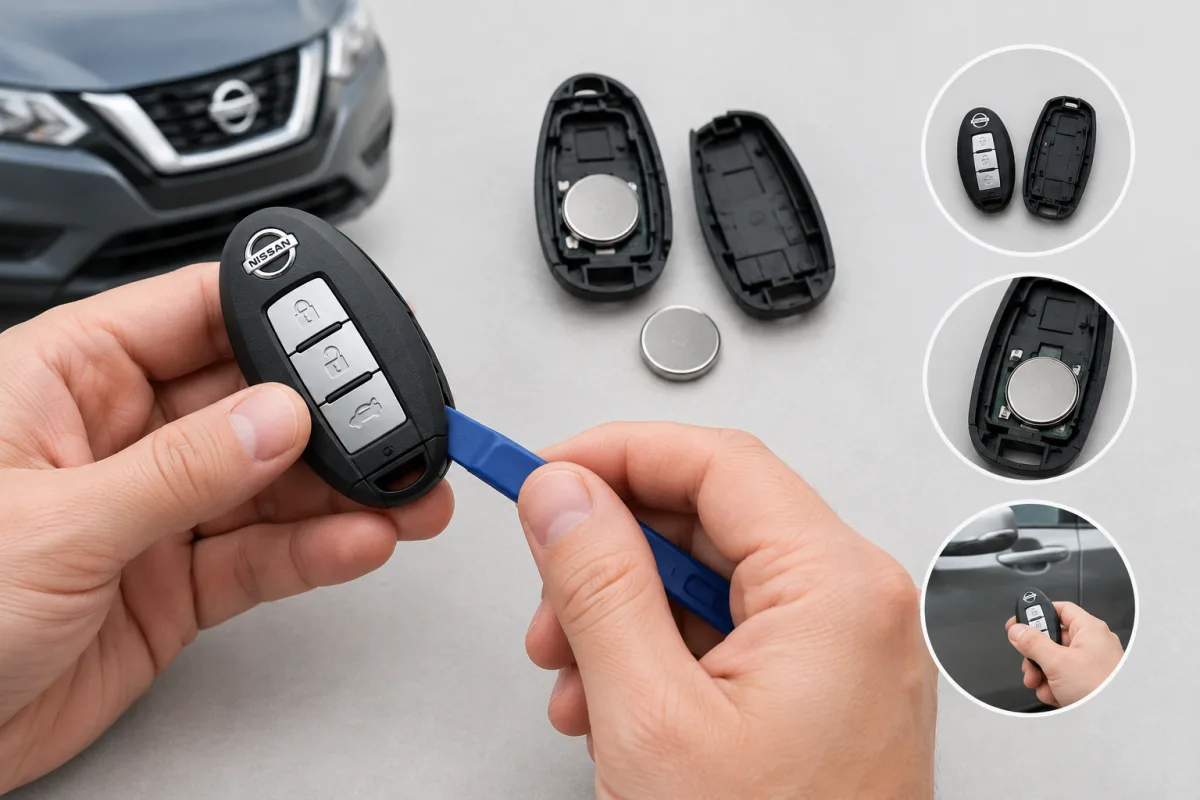
Nissan key fobs differ by model and year, but many Nissan Intelligent Keys use a similar design. You can usually open the fob by removing the hidden mechanical key and carefully separating the case at its seam. The exact battery type, polarity, and emergency-start procedure must be confirmed in the owner’s manual for your Nissan.
How to open a Nissan key fob
- Find the mechanical-key release switch on the back or end of the Intelligent Key.
- Slide or press the release and pull out the hidden mechanical key.
- Locate the seam where the two halves of the fob case meet.
- Insert a small flathead screwdriver into the seam.
- Gently twist the screwdriver to separate the upper and lower sections of the case.
Use light pressure so you do not crack the plastic, damage the circuit board, or mark the casing. Wrapping the screwdriver tip in a clean cloth can help protect the fob.
How to change the battery in a Nissan key fob
After opening the case, note how the old battery is positioned. Remove it carefully and install a new battery of the same type or an approved equivalent. Keep the battery orientation the same as the original unless your vehicle manual specifies otherwise.
Nissan battery requirements are not universal. For example, the 2022 Nissan Kicks uses a CR2032 or equivalent battery, with the positive side toward the bottom of the lower fob section. The 2019 Nissan NV uses a CR2025 or equivalent battery, with the positive side facing down. Check the Nissan owner’s manual for your exact model and year before purchasing a battery.
- Separate the fob case carefully.
- Remove the old coin-cell battery.
- Install the correct replacement with the specified polarity.
- Press the case halves together until they close securely.
- Insert the mechanical key again and test the lock, unlock, and other buttons.
Keep coin-cell batteries away from children and pets. Swallowing one can cause serious injury.
How to unlock a Nissan when the keys are inside
If the keys are locked inside the vehicle, avoid forcing the door or inserting improvised tools. These methods can damage the weather seals, paint, wiring, airbags, or locking mechanism.
- Use the mechanical key if it is available and the vehicle has a key cylinder.
- Use an eligible Nissan connected-service function for remote unlocking, if your vehicle, subscription, equipment, and mobile connection support it.
- Contact Nissan Roadside Assistance for vehicle lockout service.
Nissan Roadside Assistance
Nissan Roadside Assistance provides vehicle lockout assistance. The official telephone number is 1-800-225-2476. Nissan states that the service is available 24 hours a day, 365 days a year, subject to applicable coverage terms. Eligibility, fees, and coverage limits can vary by vehicle, warranty, mileage, and service plan.
Eligible vehicles and subscriptions may also request roadside help through the MyNISSAN App. Remote unlocking and remote-start functions depend on the Nissan model, equipment, subscription, and connectivity.
What to do when the Nissan key fob battery is dead
A discharged fob battery may still allow entry with the mechanical key hidden inside the fob. Starting the vehicle can require a model-specific emergency procedure, such as placing the Intelligent Key in a designated location or using it in a specified way near the start switch. Follow the instructions in the owner’s manual for your Nissan rather than relying on a universal method.
Nissan Owner’s Manuals provide the model-specific instructions for opening the Intelligent Key, replacing its battery, and starting the vehicle when the fob battery is discharged. The correct manual is especially important because fob construction, battery type, polarity, and emergency-start steps vary between Nissan models and years.